Import and connect
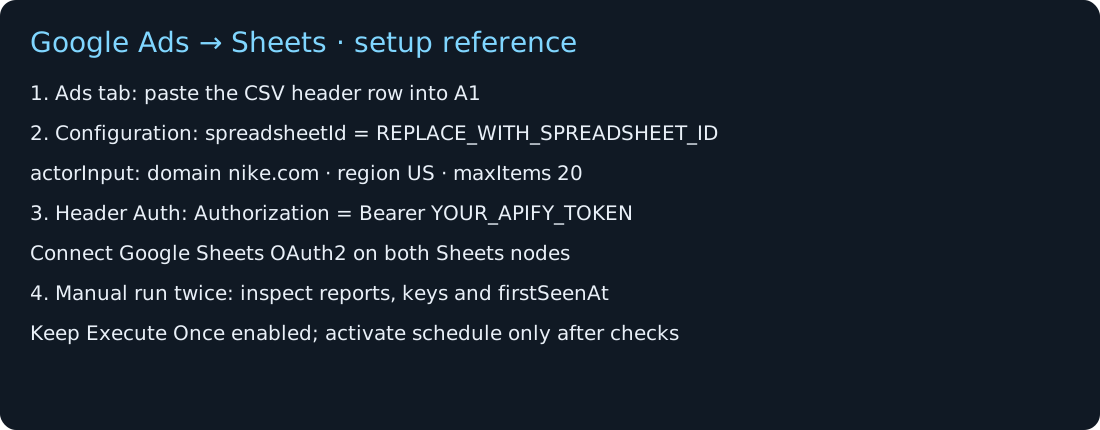
Create an Ads tab with the supplied headers. Import the inactive n8n JSON and select your own Apify and Google credentials.
Import a ready-made workflow, connect Apify and Google Sheets, and collect a small snapshot without duplicating ads you already saved.
The template is free to download. Scraping and hosting may incur costs. Starts with 20 ads per run; it is not a complete ad archive.
Create an Ads tab with the supplied headers. Import the inactive n8n JSON and select your own Apify and Google credentials.
Set its domain, region and your spreadsheet ID. Run manually with 20 rows and review the health reports and saved baseline.
Run again to check duplicate handling. Enable the daily schedule only after your own setup passes. Keep self-hosted n8n running.
The first snapshot saves your starting point. A repeat retains the same keys; an unseen ID is added to the log.
| Run | Observed IDs | Saved total | Result |
|---|---|---|---|
| First snapshot | EXAMPLE-A, EXAMPLE-B | 2 | baseline |
| Unchanged repeat | EXAMPLE-A, EXAMPLE-B | 2 | No duplicate keys |
| Unseen ID appears | EXAMPLE-B, EXAMPLE-C | 3 | EXAMPLE-C logged |
First-seen does not mean newly published. A bounded snapshot can discover older ads on later runs. Previously saved rows are retained; disappearance does not prove an ad ended.
One domain, US, copy on and details off. Source availability and limits determine what is returned.
The Actor start uses Execute Once. Saved sheet rows never need to launch their own scraper jobs. Avoid overlapping executions.
No token, private spreadsheet ID or live customer rows are included. Store credentials in n8n and choose who can access your sheet.
Fresh scraping and real scheduled execution were tested on local n8n 2.26.4 on 11 October 2026. Final read-back found 34 unique saved keys and zero duplicates. This demonstrates the tested path, not full source coverage or future reliability.
The starter sends a $0.10 maximum run charge setting. This is not a promise about your total invoice. Check current Actor pricing and your hosting costs before scheduling.
Read: Track competitor Google ads in Google Sheets with n8n
Follow the first-run checklist
You need an Apify account, n8n and Google spreadsheet edit access. No Slack account is needed.